
Network
The Network Settings page allows configuration of how the Inspector device connects to the network.
This page provides configuration options for LAN and Wi-Fi connectivity, IP addressing, DNS, proxy settings, and network status.
Ethernet 1 port: used for cloud connection and can also be accessed over the LAN.
Ethernet 2 port: a non-configurable port used for maintenance and configuration without disconnecting the Inspector from the LAN.
The Inspector web server can be accessed through the configured IP address (Ethernet 1) or via the configuration port (Ethernet 2).
To connect through Ethernet 2:
- Set the network configuration of your computer as follows:
- IP Address: 10.0.0.2
- Subnet Mask: 255.255.255.252
- Connect a laptop to Inspector Ethernet 2 connector using an Ethernet cable .
- Open a web browser and enter 10.0.0.1 to access the web server page.
- Log in using provided username and password.
- Configure the Ethernet 1 network settings.
The Running Configuration box displays the currently assigned IP address.
If the cable is unplugged, or DHCP is enabled but no DHCP server is available, this field will appear empty.
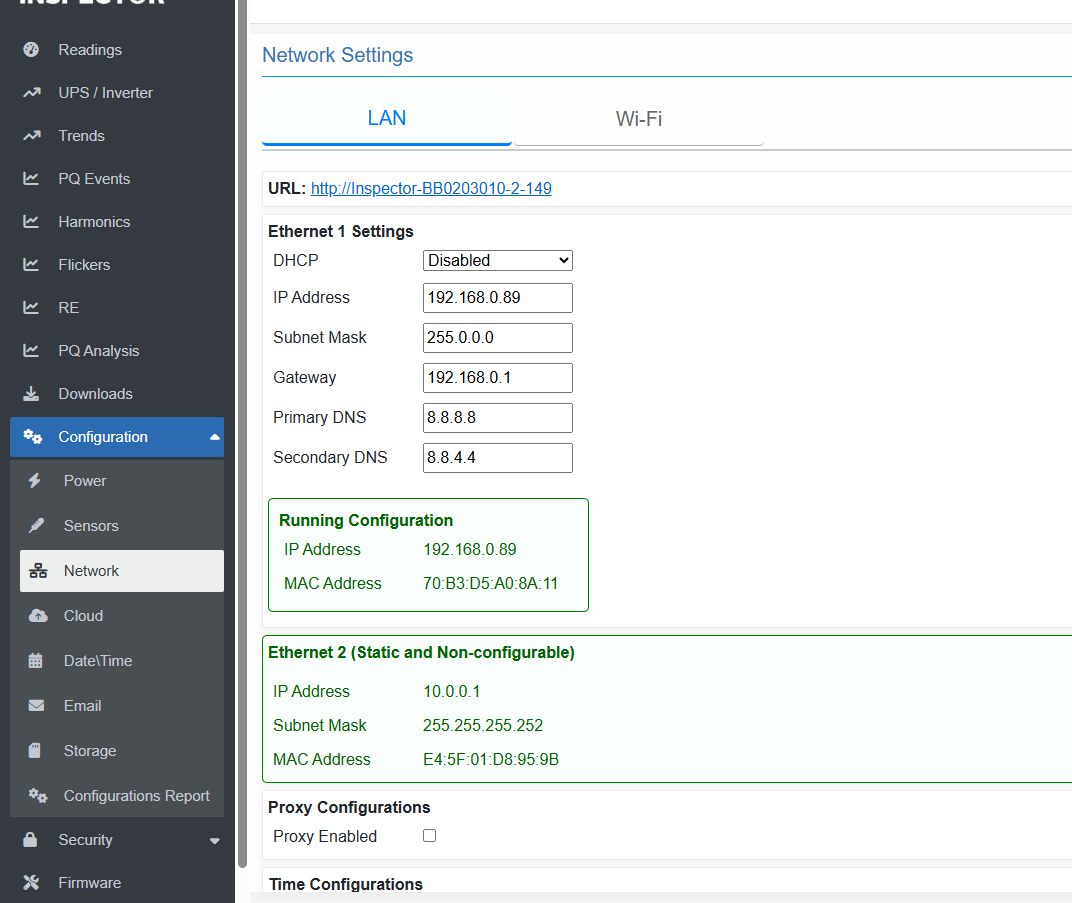
Network DHCP server dependency has three options:
- Enabled: static configurations fields are disabled, and Inspector is fully-dependent on the network DHCP server.
- Disabled: Inspector is fully-dependent on static configurations set by user.
- Fallback Profile: Inspector search for DHCP server on the network, if found, it takes configurations from DHCP, otherwise, Inspector auto-switches to the static user-defined static configurations.
Created with the Personal Edition of HelpNDoc: Make Documentation Review a Breeze with HelpNDoc's Advanced Project Analyzer