
3G Connection
To download TP-LINK resources, Go to Download Center page.
To download TP-LINK emulators, Go to TP-LINK Emulators page.
For more information and any questionnaire, Go to TP-LINK Support page.
|
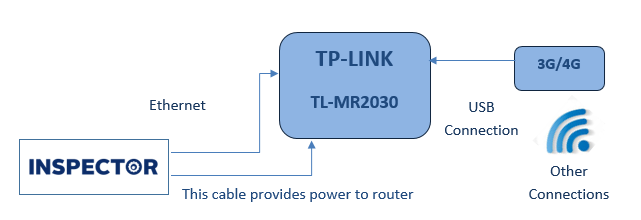
Only this list of 3G/4G Modems will work with TP-LINK router. It’s NOT allowed to reverse Ethernet cables with XMB cables. |

As shown in previous figure, some connections will be declared as following:
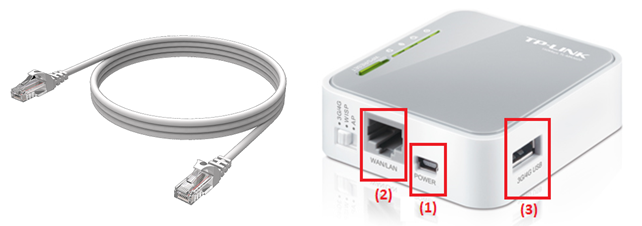
- TP-LINK modem connections as shown:
- Power supplies modem via Inspector
- Ethernet cable connected to Inspector
- 3G/4G USB connection
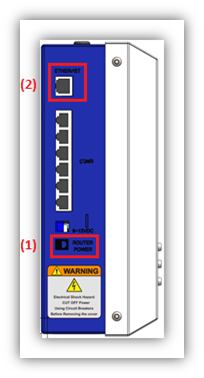
- Inspector connections with modem:
- Power cable and if is reversed, connection will fail
- Ethernet connection to modem
Emulators:
Emulation refers to the ability of a computer program in an electronic device to emulate (or imitate) another program or device.
An emulator is hardware or software that enables one computer system (called the host) to behave like another computer system (called the guest). An emulator typically enables the host system to run software or use peripheral devices designed for the guest system.
TP-LINK Emulators:
- This Emulator is a virtual web GUI where you can program your TP-Link product firmware
- Please check the firmware version corresponds to the version shown on the Emulator interface. Each firmware version has its own GUI and functionality
Here is list of all TP-LINK Emulators online used for modems or Wi-Fi routers.