
Alarms Default Configurations Page
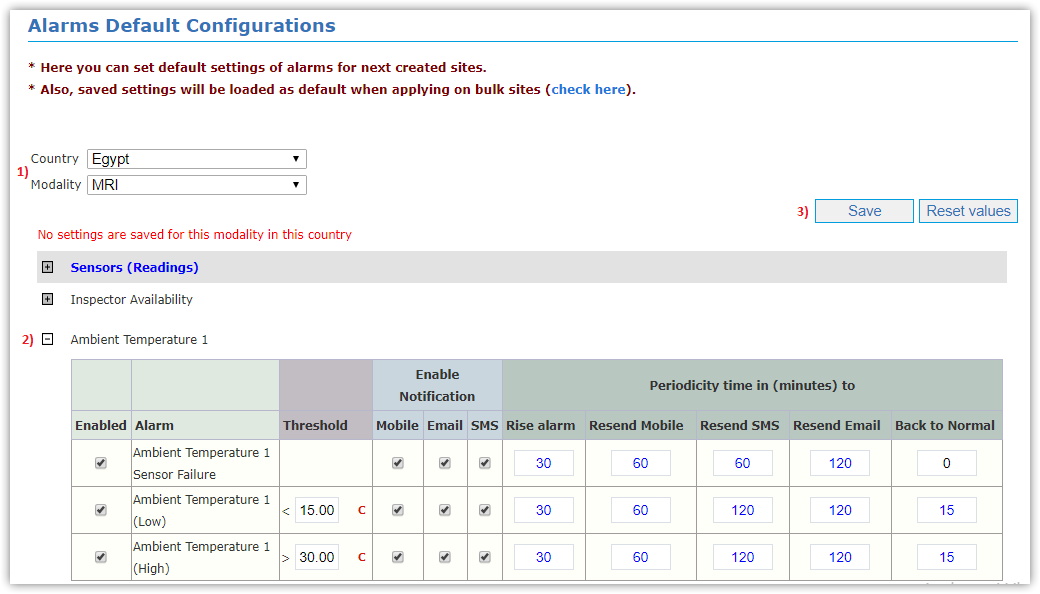
This page is responsible for setting alarms default of next created sites and those saved settings will be loaded as default,
when applying on bulk sites in Change Alarms Configurations for Bulk sites page as following:
- Select Country and Modality you want to set defaults for.
- Edit in Sensors Readings:
- Enable Alarm
- Alarm Threshold
- Enable Notification
- Periodicity Time
- Click Save button to save data, or Reset Values & Save buttons to cancel changes you do and returns to default.
For more information about alarms behavior and custom conditions, check Alarms Service Process chapter.