
Alarms History
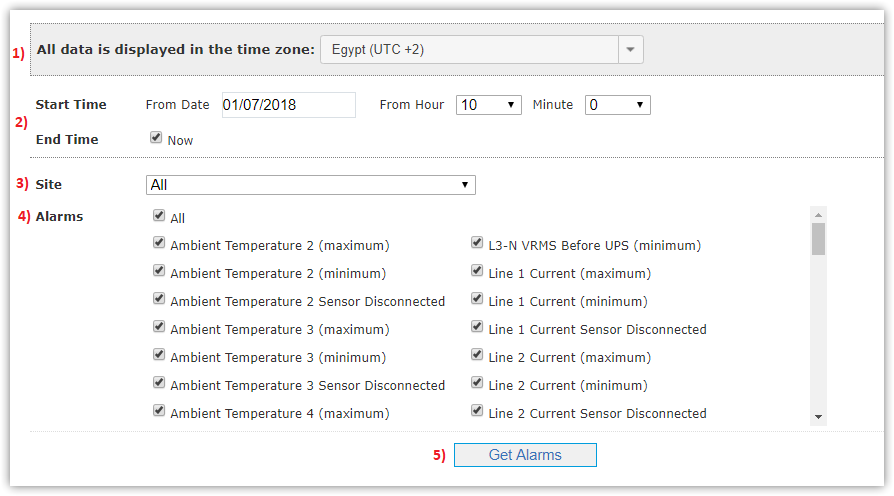
This page shows up history of specific alarms at specific time for your country as following:
- Select Time Zone.
- Determine Start Time interval you want to show events from, and End Time interval you want to show events to,
and can also select Now to get history till right now.
- Select Site you want to show its alarm’s history.
- Select Alarms types you want or select All.
- Click Get Alarms button.
|
You can get alarms history only for last 3 months, if you want earlier than this interval just contact Support. |

Number of alarms appears above the page and alarms list with (Site Name, Alarm Type, Time it raised and ended on and Duration take).
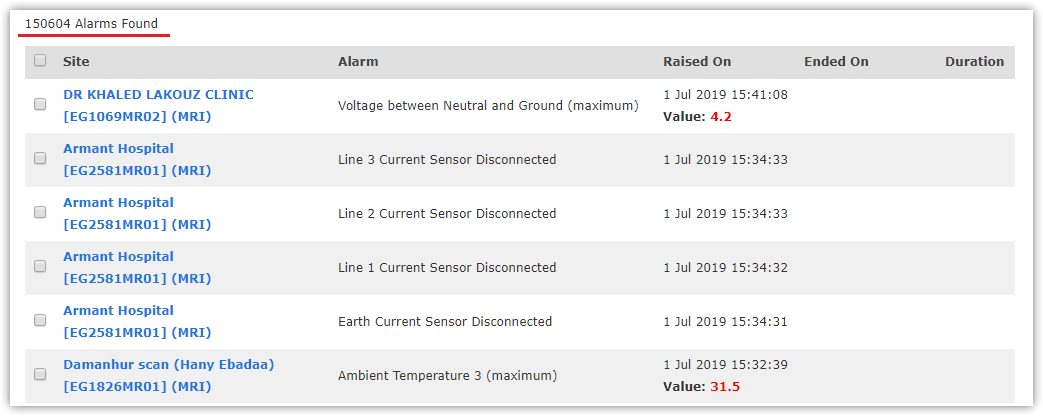
You can also download alarm's history as PDF file from Generate PDF button and as Excel sheet from Generate Excel button.

|
Alarms history is affected by renaming environmental parameters as declared in 'Readings & Alarms' tab in Edit Site page. New parameter name will not affect on alarms history in the interval before renaming. |