
Sync to cloud
This page provides a manual option to synchronize locally stored data with the cloud server.
This function is typically used to re-transmit data that was not successfully delivered due to network interruptions or connection issues.
The synchronization period is defined using:
- From – Start date and time
- To – End date and time
The device checks for any unsent data within the selected time range.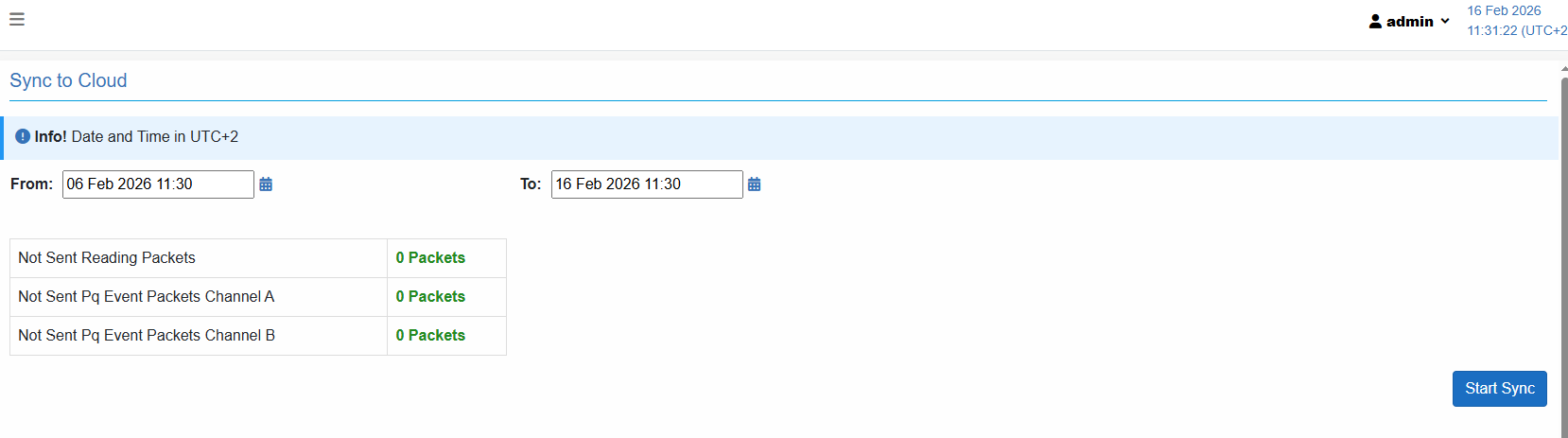
Press Start Sync to re-transmit all data within the selected time range to the cloud server.
If some of the data was previously transmitted, duplicate records are automatically filtered on the cloud side to ensure that only one record is stored.
The table displays the number of data packets that have not yet been transmitted to the cloud server:
- Not Sent Reading Packets
Indicates the number of periodic measurement data frames pending transmission. - Not Sent PQ Event Packets – Channel A
Indicates the number of unsent Power Quality event frames recorded on Channel A.
- Not Sent PQ Event Packets – Channel B
Indicates the number of unsent Power Quality event frames recorded on Channel B.
A value of 0 Packets confirms that all data has been successfully synchronized.
Created with the Personal Edition of HelpNDoc: Easy EPub and documentation editor