
XMB Address Configuration
Each XMB unit must have a unique address configured using the DIP switches on the device.This address allows the Inspector to identify and communicate with each connected XMB unit.
Note: The XMB unit address can also be entered using the "Add XMB" icon, even if the unit is not currently connected to the Inspector.
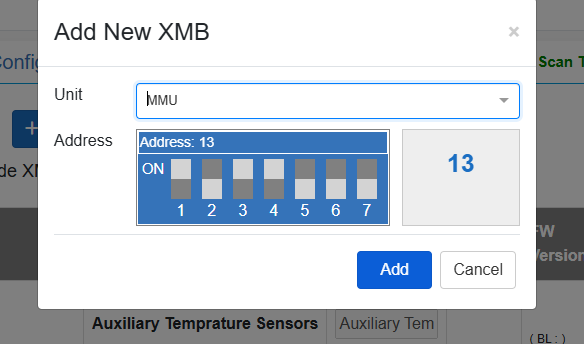
The address is graphically represented according to the DIP switch configuration read by the Inspector.
- Each of the 7 switches can be set to either ON or OFF, providing 128 possible address combinations.
- Addresses must be unique for each XMB type.
- Two different XMB types (e.g., THPAQ and MMU) may have the same address.
Created with the Personal Edition of HelpNDoc: Transform Your Word Doc into a Professional-Quality eBook with HelpNDoc