
Archived Sites Page
This page is responsible for archiving sites deleted from Manage Sites page.
Archived sites can be filtered as following;
- Select Country/All.
- Select site Name/ID.
- Click Search button.
You can also get sites restored back again from Restore link.
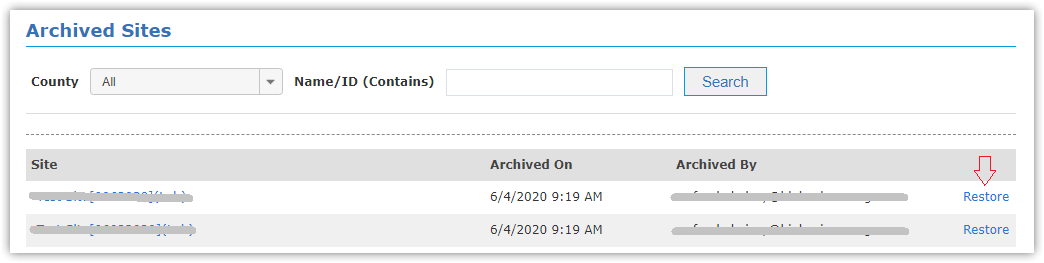
|
Restored sites get back with SUSPENDED status. |

Notes:
- Archived sites disappear from all pages, EXCEPT:
- When site is archived, all remaining credit returns back to the corresponding invoice, as following:
- If the remaining months till next expiration date are less than 15 days, it's considered as ZERO points
- If the remaining months till next expiration date are more than 15 days, it's considered as ONE month (one point)
- According to the last renewal process of the archived site, the remaining credit returns back to the corresponding invoice(s).
- You can ensure refunded points to corresponding invoices from Subscription Renewals History page.
Example:
- Today is 06.06.2020, Next Expiration Date is 04.10.2020, Last Renewal for this site was 6 points from Invoice No.5
- Remaining days are 3 months and 28 days
- Refunded points are 4 points
- So 4 points are refunded to Invoice No.5
- Today is 20.06.2020, Next Expiration Date is 20.03.2021, Last Renewal for this site was 6 points from Invoice No.5 &
previous from Invoice No.7
- Remaining days are 9 months
- Refunded points are 9 points
- So 6 points are refunded to Invoice No.5
and 3 points are refunded to Invoice No.7
you can also monitor the history of archived sites in Sites Archiving History page.